Gemini 3.8 Live vs GPT-Live-1: 10 Checks for Realtime Voice and Meeting Summary

Gemini 3.8 Live vs GPT-Live-1: 10 Checks for Realtime Voice and Meeting Summary
The call sounds finished. You hung up, the waveform is still on screen, and the only thing you can find later is a half-sentence you remember from minute forty-seven. Someone interrupted. Someone else said “let me check that” and kept talking. The useful part is buried in overlap, not in a clean turn.
That is the decision hiding under Gemini 3.8 Live vs GPT-Live-1. Both models are live speech systems for agents that talk while they work. Neither is Gemini 3.8 Flash, the text and multimodal speed model. Mixing those names is how you buy the wrong SKU.
Most roundups stop at a leaderboard screenshot. This one is a 10-check list you can run on a real meeting or a voice agent before you commit a week of integration. The last checks are the ones launch posts skip: what is left after the session ends.
Table of Contents
- Why does Gemini 3.8 Live vs GPT-Live-1 change a meeting workflow?
- What are the 10 checks for realtime voice and meeting summary?
- How does Gemini 3.8 Live behave in a live session?
- How does GPT-Live-1 behave when you pair a backend?
- Which model should you pick for voice agents vs meeting artifacts?
- After the call, how do you turn the recording into searchable notes?
- FAQ
Why does Gemini 3.8 Live vs GPT-Live-1 change a meeting workflow?
The launch week is a five-day split, not a bake-off of the same product. OpenAI put GPT-Live-1 in the API on 10 September 2026. Google followed on 15 September with Gemini 3.8 Live and Gemini 3.8 Live Extended Thinking. Both teams are solving the same latency complaint: a voice agent that goes quiet the moment it has to think, call a tool, or look something up.
Google’s post, by Tom Ouyang and Malini Jaganathan for the Gemini Audio Team, frames 3.8 Live as the scale and cost SKU (fluid dialogue plus visual grounding) and Extended Thinking as the high-complexity SKU (multi-step reasoning while it keeps talking). SiliconANGLE’s same-day write-up by Mike Wheatley is useful because it repeats the architecture in plain language: near-real-time reasoning, speech and thought at once, tool calls in the background.
That is a conversation problem. A meeting summary problem is different. After hang-up you still need a timestamped transcript, a file you can search, and a note you can reopen next week. Live audio does not emit those objects by default. I’d treat every “we now talk like a person” demo as incomplete until you can point at the artifact.
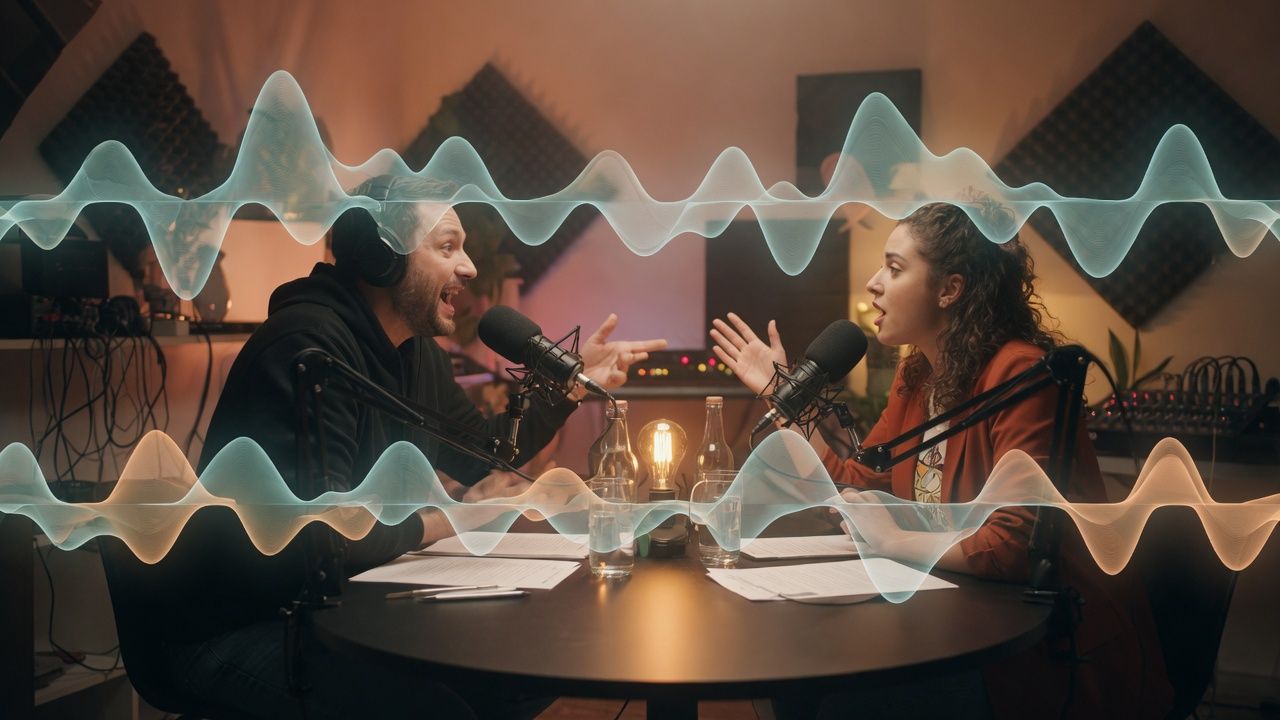
The picture below is the scene these models are built for — two people talking over each other, not taking turns like a radio:
Illustration: full-duplex conversation looks like overlap, not a clean hand-off. Drawn for BibiGPT’s GPT-Live-1 workflow notes.
Do not fold this launch into three nearby pages that already exist. Gemini 3.5 Live Translate is voice-to-voice translation in the moment. Gemini 3.5 Transcribe is speech-to-text for a recording you still need later. Gemini 3.8 Flash is a text and multimodal speed model. Live is the speech-dialogue family.
Practical rule: If the value has to survive after hang-up, you are not done when the voice sounds natural. You are done when the transcript is searchable.
What are the 10 checks for realtime voice and meeting summary?
Run these ten before you pick a live model. They are operational, not vibes. Checks 1–8 tell you which live SKU to build against. Checks 9–10 tell you whether you still need a video-to-text converter after the call.
- Job. Are you building a voice agent that must keep talking, or archiving a meeting you will search next Tuesday? Live APIs optimize the first job.
- Duplex. Can the model listen while it speaks, and recover from interruptions? GPT-Live-1 is sold as full duplex. Gemini 3.8 Live is sold as fluid live dialogue with mid-sentence interruptions and background tools — verify duplex in your client, not in a keynote.
- Visual input. Gemini 3.8 Live takes images, audio, and video and grounds replies in what the camera sees. GPT-Live-1’s API launch is audio and text; independent write-ups of the OpenAI post note image and video are not in that SKU. If the agent has to see a whiteboard, that check is already decided.
- Language switch. Google says 3.8 Live auto-detects and switches among 97 languages mid-conversation. OpenAI says GPT-Live-1 ships 12 realtime voices and will expand language coverage later. If your stand-up is mixed-language, count the languages you actually use, not the brochure.
- Tools without a dead air gap. Both stacks now claim background tool calls. Gemini keeps the function call inside the live session. GPT-Live-1 delegates tools and deeper reasoning to a backend you choose.
- Where reasoning lives. Launch-day architecture coverage (The New Stack, 15 September 2026) is the useful split: Gemini Extended Thinking reasons inside the voice session; GPT-Live-1 is a conversation front-end paired with a backend such as GPT-6 Astra. Do not score them as one model.
- Benchmarks. Google cites Extended Thinking at 82.6 on Artificial Analysis’ Speech-to-Speech Quality Index, 68.6% on τ-Voice, 35.1% on Sierra’s τ-Voice-banking, and 97.7% on Big Bench Audio. Base 3.8 Live is second on Speech Agent Arena. OpenAI cites a 30 percentage-point Full Duplex Bench gain over GPT-Realtime-2.1, and Tau3 leadership when GPT-Live-1 is paired with GPT-6 Astra. These are voice-agent scores. They are not meeting-summary quality.
- Price as billed, not as demoed. Google’s developer post lists $0.005/min audio in and $0.018/min audio out for 3.8 Live. Extended Thinking also bills reasoning tokens plus extra inputs such as video. OpenAI bills GPT-Live-1 at $0.05/min for the front-end voice layer, per second; backend models and tools are extra. An hour of overlapped in+out on Google’s published rates is about $1.38; an hour of GPT-Live-1 voice is $3.00 before the backend.
- Artifact. After hang-up, do you have speaker-aware text, word-level times, and an export (SRT / VTT / plain text)? Live sessions often give you a conversation. Summary work needs a document.
- Keep and reuse. Google watermarks generated audio with SynthID. That is a provenance feature for audio the model spoke. It is not a substitute for storing the human meeting as text you own.
The interrupt-heavy meeting in the next frame is why check 2 and check 9 both exist — duplex keeps the talk going; it does not file the decision:

Illustration: interruptions are a duplex feature in the live layer and a slicing problem in the summary layer.
Practical rule: Score checks 1–8 on the live API. Score checks 9–10 on the file you can still open next week. If those two scores disagree, you need two systems.
How does Gemini 3.8 Live behave in a live session?
Gemini 3.8 Live is a native speech-to-speech model with visual grounding, not a Flash checkpoint with a microphone. The Gemini 3.8 Live model card lists text, images, audio, and video in, text and audio out, a 131,072-token input window, function calling, search grounding, and interleaved reasoning. It is the default low-latency Live API SKU. Extended Thinking is the sibling you reach for when background reasoning has to stay in the same session.
Google’s 15 September consumer and developer posts agree on the session behavior:
- Visual context in near real time (Search Live pointing a camera at a leaky pipe is the consumer demo; onboarding and chess are the enterprise clips).
- Mid-conversation language switches across 97 languages.
- Asynchronous function calls: the model can say it is checking, keep talking, and come back when the tool returns.
- Extended Thinking narrates progress (“Let me check that…”) instead of going mute.
Unite.AI’s launch recap is a clean second source for the same rollout: Gemini API, Google AI Studio, Gemini Enterprise (private preview), Search Live, Gemini Live, and Workspace surfaces (Docs Live, Gmail Live, Keep Live, with subscriber caveats).
Google for Developers posted a same-day walkthrough of the Live API changes — async tools, proactive audio, context injection, Extended Thinking in the background. Watch that before you copy a Flash sample into a voice agent:
Video source: YouTube · Google for Developers · What’s new in the Gemini Live API (7:16), 15 September 2026.
Pricing belongs in the same paragraph as capability. The developer audio post states $0.005/min input and $0.018/min output. SiliconANGLE adds that Extended Thinking bills reasoning tokens and extra modalities. Do not quote a single per-minute number for both SKUs.
Gemini 3.5 Transcribe, launched 26 August 2026, is the file-shaped cousin: Artificial Analysis WER cited by Google at 4.0% streaming / 2.6% non-streaming, 85+ languages, speaker labels and word-level timestamps on the file endpoint. Use it when the job is “this recording must become text.” Do not use Live as a substitute for Transcribe, and do not use Flash as a substitute for Live.
Decision filter: If the agent must see the room and keep talking while a tool runs, Gemini 3.8 Live is the SKU to prototype first. If you need diarized timestamps, you have already left the Live SKU.
How does GPT-Live-1 behave when you pair a backend?
GPT-Live-1 is a full-duplex front-end. The thinking model is a separate bill. OpenAI’s 10 September post is explicit: it listens and speaks at the same time, handles interruptions, and delegates deeper reasoning and actions to the models and tools you pair it with — the same split already shown with Codex and ChatGPT Work.
The OpenAI developer community announcement, posted with the launch, is the most numeric public sheet:
- Voice sessions $0.05 per minute, billed per second; backend and tools extra.
- Full Duplex Bench +30 percentage points vs GPT-Realtime-2.1.
- Turn-taking latency 0.798 s vs 1.41 s for GPT-Realtime-2.1 (community figures).
- Paired with GPT-6 Astra at medium reasoning, the OpenAI developer announcement lists 83.6% Tau3 first-attempt vs 45.7% for GPT-Realtime-2.1.
- 12 realtime voices (Quartz, Ripple, Vesper, Willow, Stone, Gleam, Meridian, Bossa, Tempo, Beacon, Delta, Cinder).
The official 77-second API clip says the same pricing line out loud: five cents a minute is the front-end. Backend inference is separate. That is the number people misread as “an hour of GPT-Live-1 is always three dollars of total intelligence.” It is three dollars of voice, plus whatever Astra (or a cheaper backend) burns.
Modalities matter as much as duplex. Launch coverage of the API SKU describes audio and text in and out, not camera frames. If your meeting summary depends on “what was on the slide,” GPT-Live-1 is not the visual path on day one. Gemini 3.8 Live is.
A numbered loop that matches how OpenAI actually sells the stack:
- Put GPT-Live-1 on the microphone and speaker — interruptions, backchannels, noise.
- Pick a backend for tools and hard questions (Astra when the task is heavy; a lighter model when it is rote).
- Keep a transcript sidecar. Native ASR text is a start; it is not an SRT.
- Slice chapters on interruptions and topic turns, not on a five-minute clock.
- Export a document the rest of the team can search without replaying the tape.
- Only then summarize. A live “recap” you heard once is not the archive.
- Measure cost as voice minutes plus backend tokens, or the spreadsheet lies.
The control you want after that loop is not another live console. It is a picker that treats transcription as a job you can rerun when names are wrong:
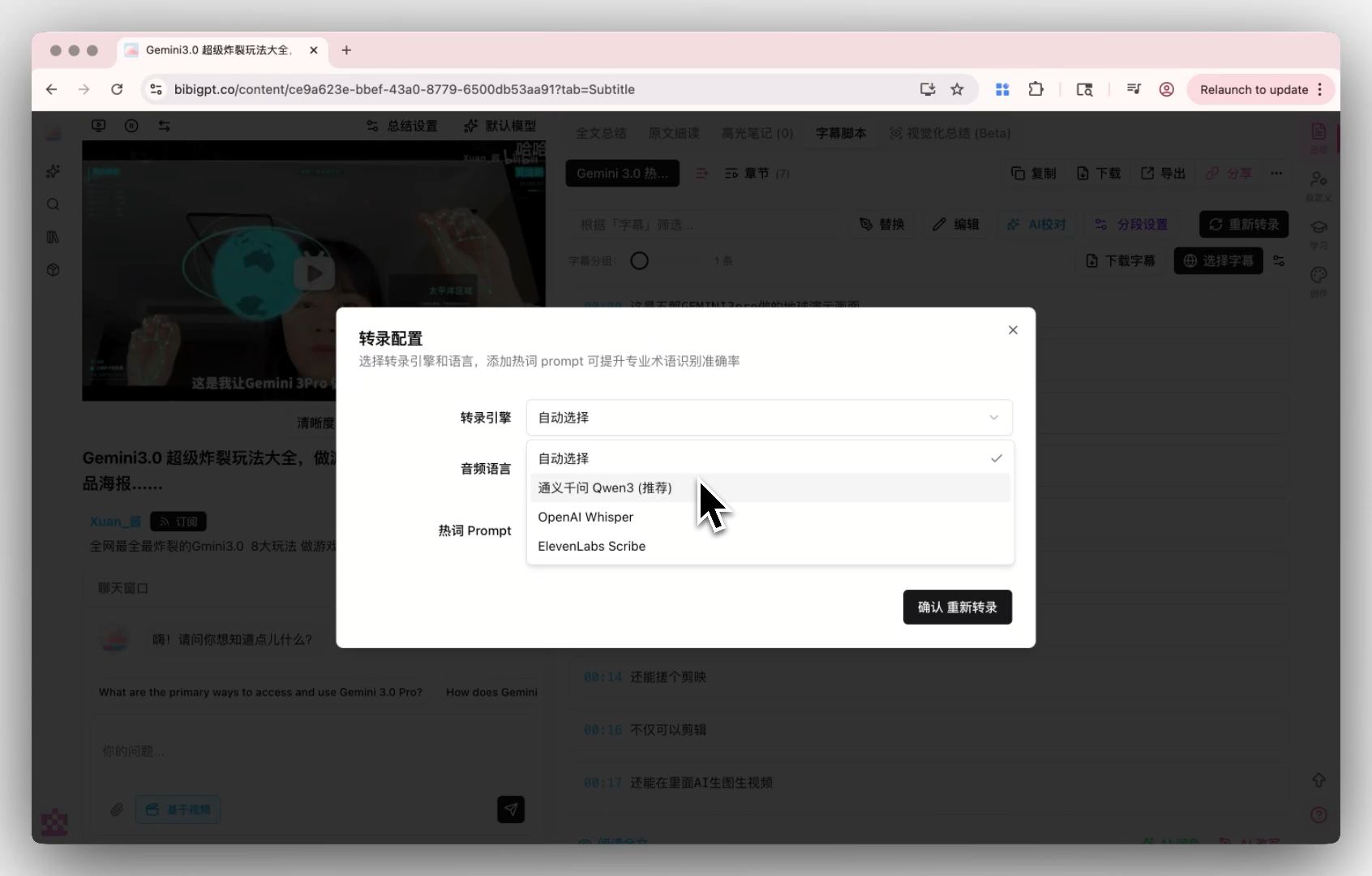
Screenshot: BibiGPT · custom transcription engine — rerun speech-to-text when the live sidecar mangles names.
Practical rule: Price GPT-Live-1 as a microphone with manners. Price the backend as the brain. Never add those two invoices in your head and call it one model.
Which model should you pick for voice agents vs meeting artifacts?
Pick on the job, then on vision, then on who owns reasoning. The table is the decision surface. Columns are constraints you can actually test this week.
| Constraint | Gemini 3.8 Live | GPT-Live-1 | Best when |
|---|---|---|---|
| Conversation shape | Live dialogue, interruptions, 97-language switch | Full duplex front-end, 12 voices | You need overlap that sounds like people |
| Vision in-session | Images, audio, video in the Live API | Audio + text at API launch | The agent must see a board or a part |
| Reasoning | In-session (esp. Extended Thinking) | Delegated to a backend you choose | You want one session vs a harness you already run |
| Published voice price | $0.005 in / $0.018 out per min | $0.05/min front-end; backend extra | You are optimizing minutes, not demos |
| After hang-up | Conversation + optional transcript UI (Search Live has a transcript link) | Native ASR text; still not a meeting archive | You need SRT, search, and next-week recall |
Google also reports Extended Thinking at 82.6 on the Artificial Analysis speech-to-speech index and a Pareto-style result on ServiceNow’s EVA-Bench, run on the Live API on Gemini Enterprise Agent Platform. Treat those as vendor-cited agent scores. They do not tell you whether Tuesday’s standup is searchable.
A short filter:
- Voice agent that must see and talk → Gemini 3.8 Live (or Extended Thinking if the tool chain is long).
- Voice agent that must feel full-duplex and you already have a backend harness → GPT-Live-1.
- Meeting or podcast you will quote later → record, then run a video-to-text pass. Live is the capture layer, not the archive.
- Foreign-language lecture you will restudy → that is still a subtitle job, closer to the Live Translate article than to either live SKU.
Decision filter: Ask one question first. Will anyone need this as text next week? If yes, the live model is an input, not the product.
After the call, how do you turn the recording into searchable notes?
The live layer keeps the conversation human. The summary layer keeps the decision findable. Those are not the same API. Paste the recording or the platform URL, get a timestamped transcript, then summarize. Do not start in a model console unless you already have a clean audio file.
That is the shape of BibiGPT’s video-to-text path: link or file in, transcript and chapter notes out, export when you need a file. It is the missing half of every live-model launch post. Trusted by over 1 million users, with over 5 million AI summaries generated across 30+ platforms — the point of those numbers is reuse, not another voice demo.
A five-step loop that does not fight the live SKU you just picked:
- Capture with the live model if you need an agent in the room. Gemini 3.8 Live if vision matters; GPT-Live-1 if duplex plus your own backend matters.
- Keep the recording anyway. A live transcript UI is a courtesy. A file is the archive.
- Transcribe for timestamps and speakers. Gemini 3.5 Transcribe’s file endpoint is the Google-shaped version of this job; a product pass is the version that starts from a YouTube or meeting URL.
- Export two copies. SRT or VTT for locating; plain text for reading and for notes apps.
- Summarize on top of the transcript. Chapters, action items, and “what did we decide?” only work if the words are stable.
The segmentation screen below is what speaker-aware, jumpable lines look like when the transcript is treated as a document, not a caption overlay:
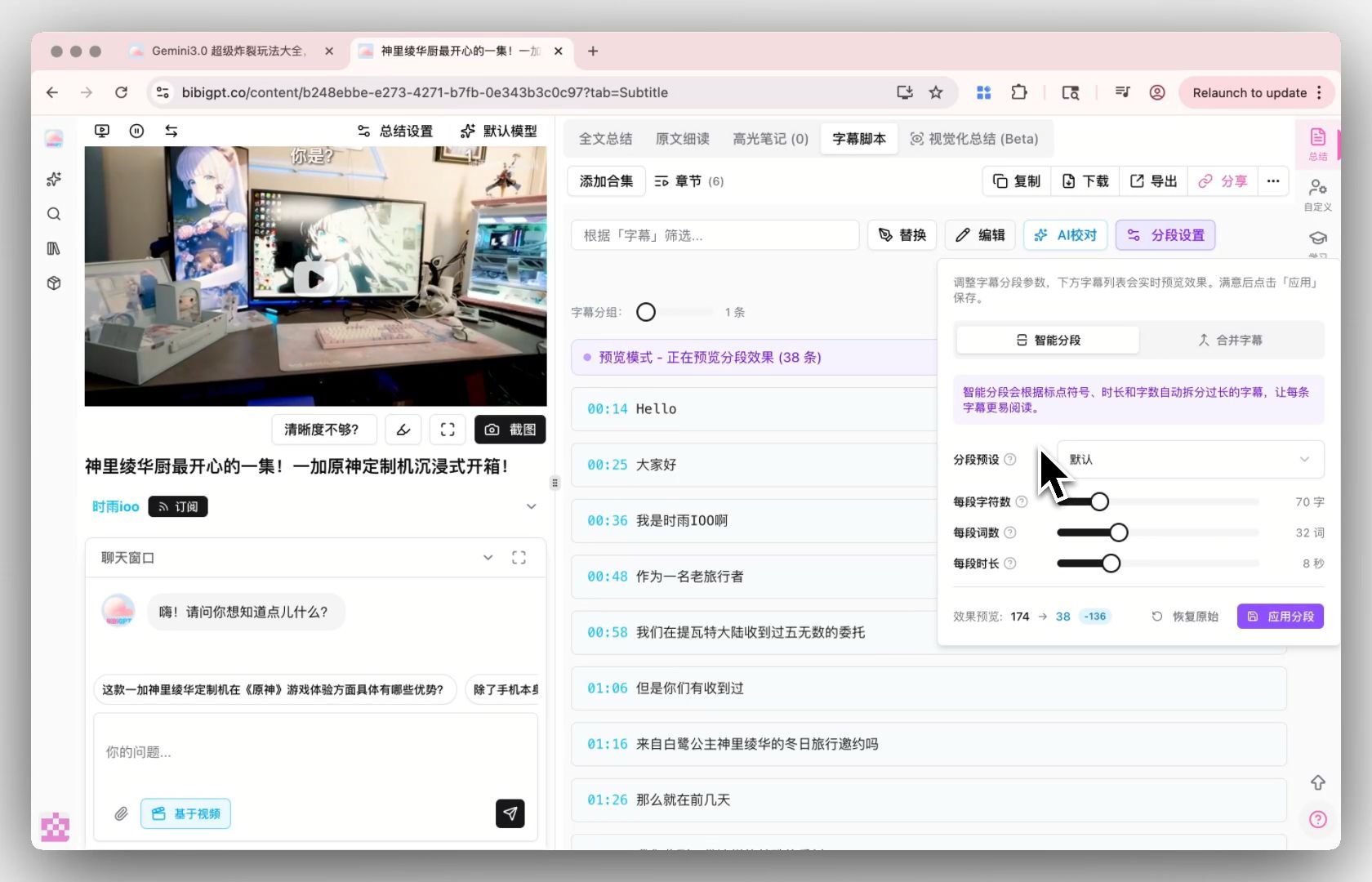
Screenshot: BibiGPT · smart subtitle segmentation — each line keeps a duration you can jump back to.
The next screenshot is the export surface that check 9 is actually asking for — formats you can take out of the player:
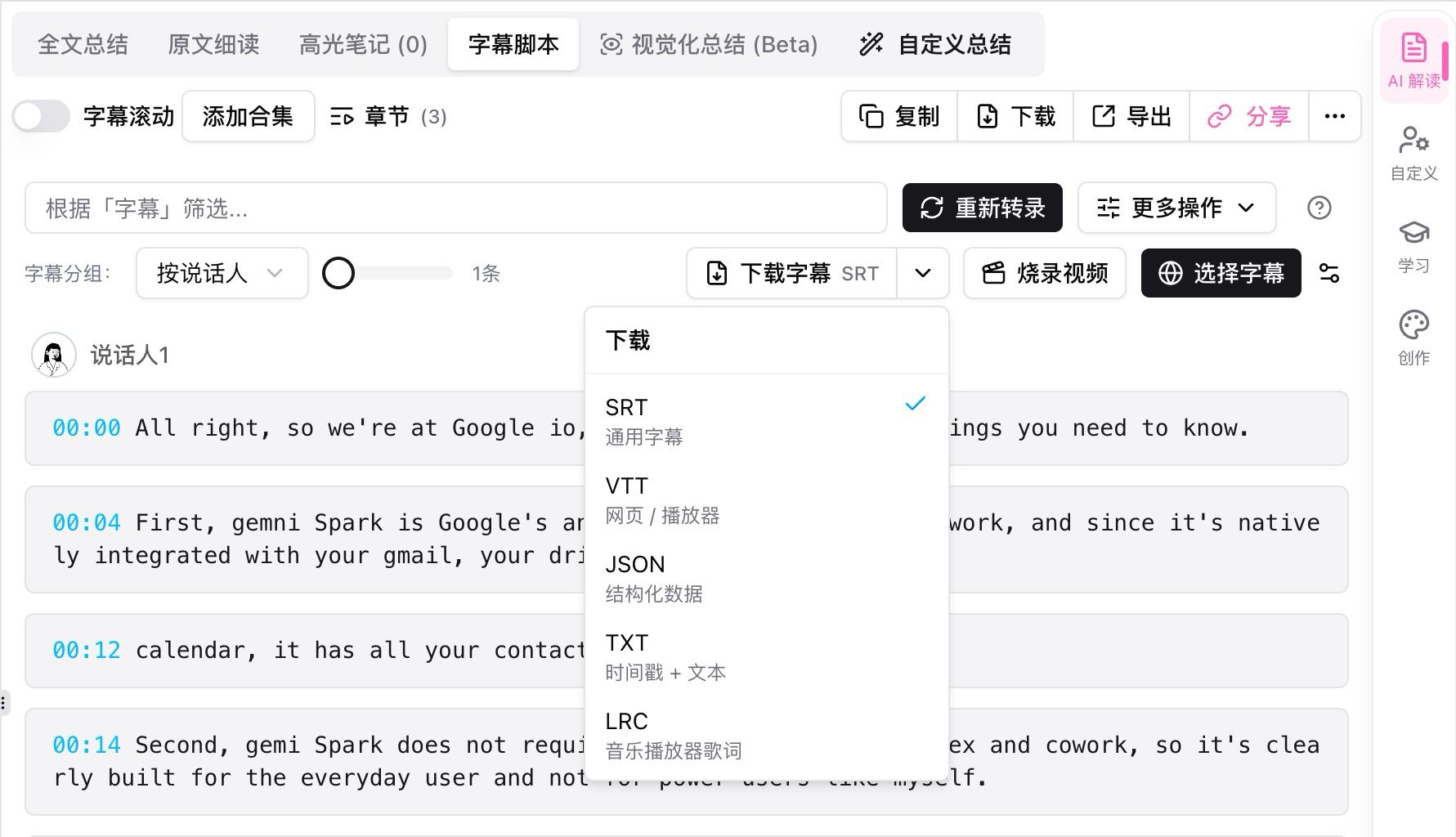
Screenshot: BibiGPT · transcript download formats — the meeting is not done until this file exists.
If you want the “paste a link, get timestamped takeaways” shape before you wire any live API, the demo below is that loop:
Summarize any video in seconds
Pick a sample below to see the AI summary — TL;DR, key points, and jump-to timestamps.
TL;DR: Karpathy builds a GPT-style language model from scratch in code, explaining every piece — from a tiny character-level model up to the full Transformer.
Key points
- Start with a bigram model, then add self-attention so tokens can "talk" to each other
- A Transformer block = multi-head attention + feed-forward + residual connections + layer norm
- Training is just predicting the next token; scale and data do the rest
- The same architecture behind nanoGPT is what scales up to ChatGPT
Jump to
- 00:07 Why build GPT from scratch
- 08:23 Self-attention, intuitively
- 1:00:00 Assembling the Transformer block
- 1:35:00 From nanoGPT to ChatGPT
Demo: paste a link, get a chaptered summary with timestamps — the artifact live voice still has to hand off to.
The people who get the most from this launch week do not ask which model “won” Speech-to-Speech. They ask what the extracted file is for. If you want that file from a recording you already have, sign in and drop it on the desktop.
Start your AI efficient learning journey now:
- 🌐 Official Website: https://bibigpt.co
- 📱 Mobile Download: https://bibigpt.co/app
- 💻 Desktop Download: https://bibigpt.co/download/desktop
- ✨ Learn More Features: https://bibigpt.co/en/features/video-to-text-converter
BibiGPT Team
FAQ
Is Gemini 3.8 Live the same as Gemini 3.8 Flash?
No. Flash is a text and multimodal speed model. Live is a speech-dialogue model on the Live API. Google shipped Flash earlier in September 2026 and Live on 15 September. Treat them as different products.
Did Gemini 3.8 Live beat GPT-Live-1 on every benchmark?
No. Google cites Extended Thinking at 82.6 on Artificial Analysis Speech-to-Speech and base 3.8 Live as second on Speech Agent Arena. OpenAI cites a Full Duplex Bench jump and Tau3 leadership when GPT-Live-1 is paired with GPT-6 Astra. Different tests, and none of them is a meeting-summary score.
Can GPT-Live-1 see the camera the way Gemini 3.8 Live can?
Not on the API SKU described at launch. GPT-Live-1 is sold as audio and text, with reasoning delegated to a backend. Gemini 3.8 Live accepts images and video in the same live session.
Should I use a live model to summarize a two-hour recording?
Use it in the room if you need an agent. For the archive, transcribe the file. Live APIs are session products. Summary is a document product. The best free AI video-to-text tools roundup is the cluster hub if you are still choosing the document path.
Where do Gemini 3.5 Transcribe and Live Translate fit?
Transcribe is speech-to-text for recordings (file vs live endpoints, different features). Live Translate is realtime voice-to-voice translation. Neither is Gemini 3.8 Live. Link them when the job matches; do not collapse the names.
인기 도구