Which Video Summarizer Lets You Check the Original Moment Behind Each Key Point?

Quick answer: Pick a video summarizer that attaches a clickable timestamp to every key point, so one click plays the exact second the claim came from. BibiGPT does this: each point in its summary, each node in its mind map, and each answer in its AI chat carries a timestamp that jumps back to the original video or podcast, on YouTube, Bilibili and 30+ other platforms. BibiGPT is an AI audio and video summarizer; “source-linked” summaries like these are the only kind you can verify without rewatching the whole video.
Why does a video summary need links back to the original moment?
Because a summary is a claim about a video, and you cannot trust a claim you cannot check. Language models compress an hour of speech into a few hundred words. Along the way they can merge two speakers, drop a “not”, or round a number. If the summary is plain text, the only way to find out is to rewatch the video, which defeats the point of summarizing it. A timestamp on every key point turns checking into a two-second job: click, listen to the sentence, move on.
A summary you cannot check is a rumor about the video.
This matters most where accuracy has a cost: study notes you will revise from, a quote you will put in an article, a number from an earnings call, or a step in a coding tutorial.
What should a “verifiable” video summarizer do?
It should let you go from any line of the summary to the source in one click, and back. In practice that means four things:
- Timestamps on every key point, not only on chapters. Chapter markers every ten minutes are not enough to check a single sentence.
- Clicking the timestamp plays the original, in the same view, at that second.
- The full transcript is one tab away, so you can read the surrounding context, not only hear it.
- Follow-up answers cite their moments too. When you ask the AI a question about the video, the answer should point to where the video said it.
Chapters tell you where a topic starts. Per-point timestamps tell you where a claim was made.
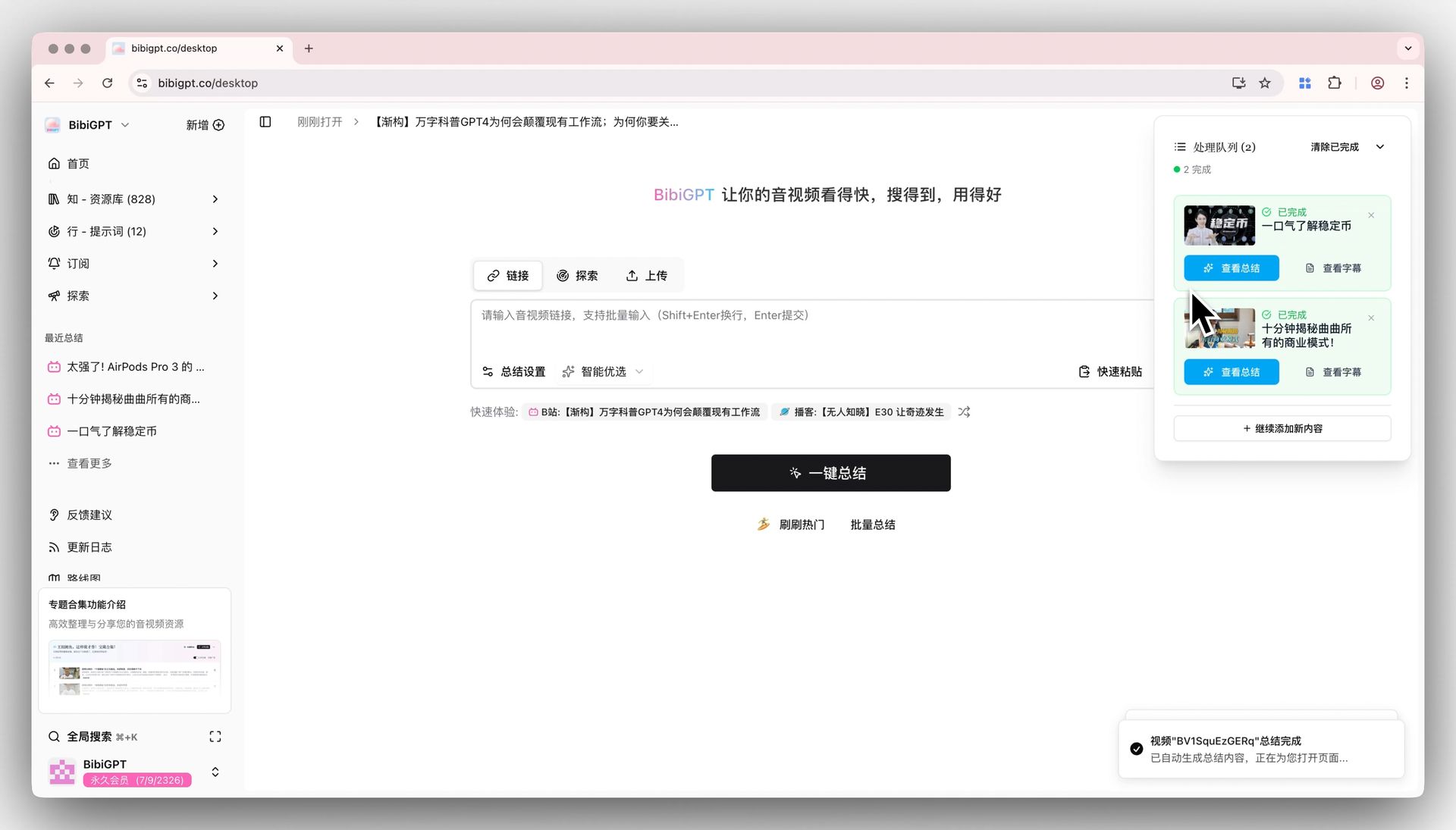
Each key point in a BibiGPT summary carries the time it was said. Source: BibiGPT summary view.
How does BibiGPT link each key point to the source?
BibiGPT keeps the timestamp on every layer it produces, so you can check from wherever you are reading:
- Summary: every takeaway shows the time it was said; click it and the player jumps there.
- Transcript: the full text is split into timestamped paragraphs, and you can jump to any of them.
- Mind map: each node carries a timestamp, so you can open the branch you doubt and play it.
- AI chat: ask “where did they say the deadline moved?” and the answer comes with a clickable timestamp to that moment.
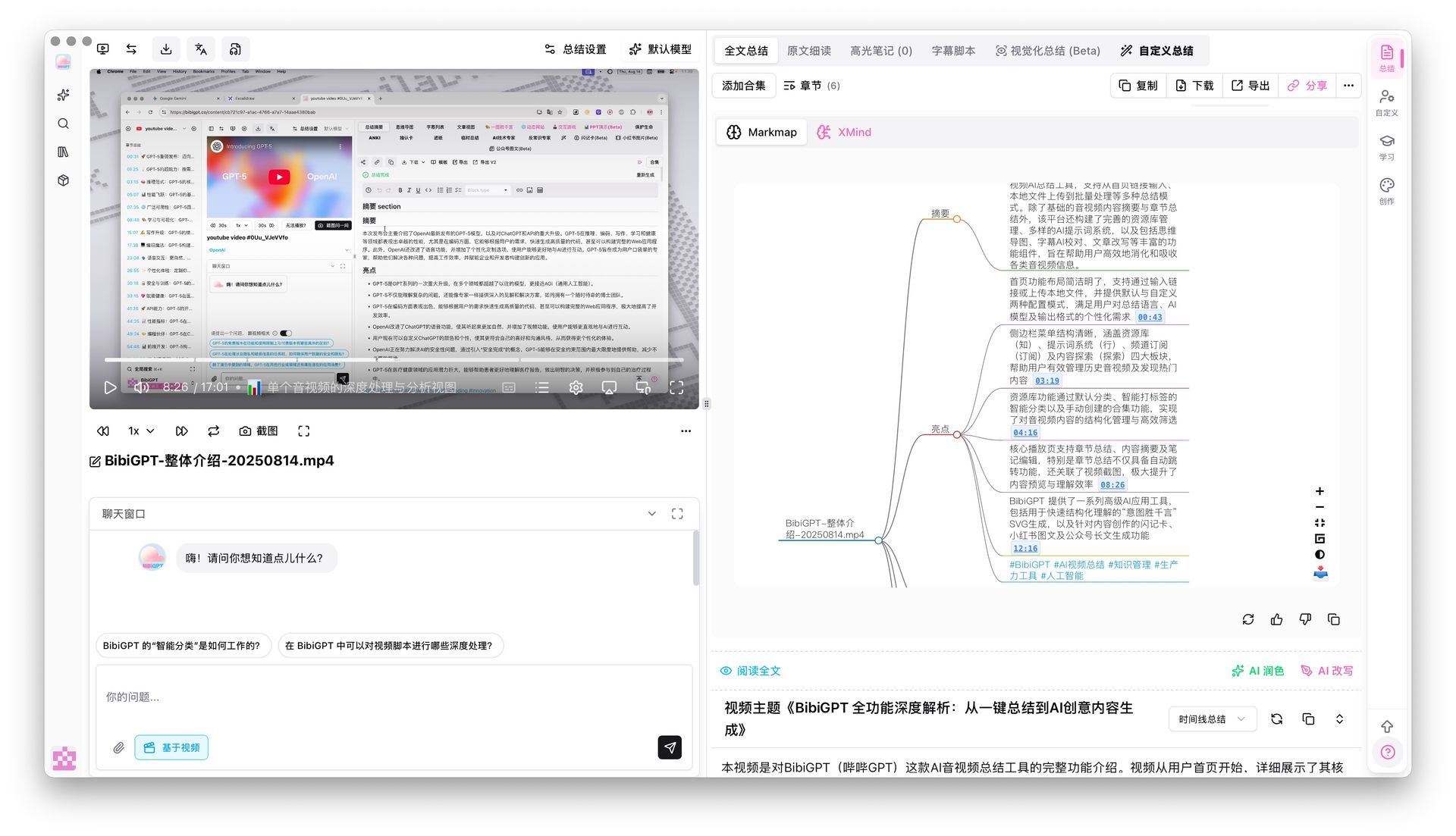
Mind map nodes jump back to their moment in the video. Source: BibiGPT mind map.
Answers in AI chat carry the timestamp they are based on. Source: BibiGPT AI chat.
The same works for podcasts and local audio or video files, not only YouTube. For a Bilibili lecture or a two-hour podcast, that is the difference between “I think the guest said that” and hearing it.
How do you check a summary against the video in practice?
Use the timestamps as a spot check, not a full replay. A routine that takes a minute or two:
- Paste the video link into BibiGPT and open the summary.
- Pick the three points you would actually act on or quote.
- Click each timestamp and listen to ten seconds around it.
- If a point is wrong or too strong, ask the AI chat about it; the answer links to the moment it relies on.
- Save the checked notes to Notion or export Markdown; the timestamps travel with them.
Check the three points you will use, not all thirty.
The demo below shows a one-click summary with its timestamps.
When can you search the whole transcript instead?
When you remember the idea but not where it was. After a video is transcribed, BibiGPT can search across the full text and jump straight to the matching clip. This is useful for long lectures and podcast archives, where you want “the part about rate limits” without skimming the summary first.
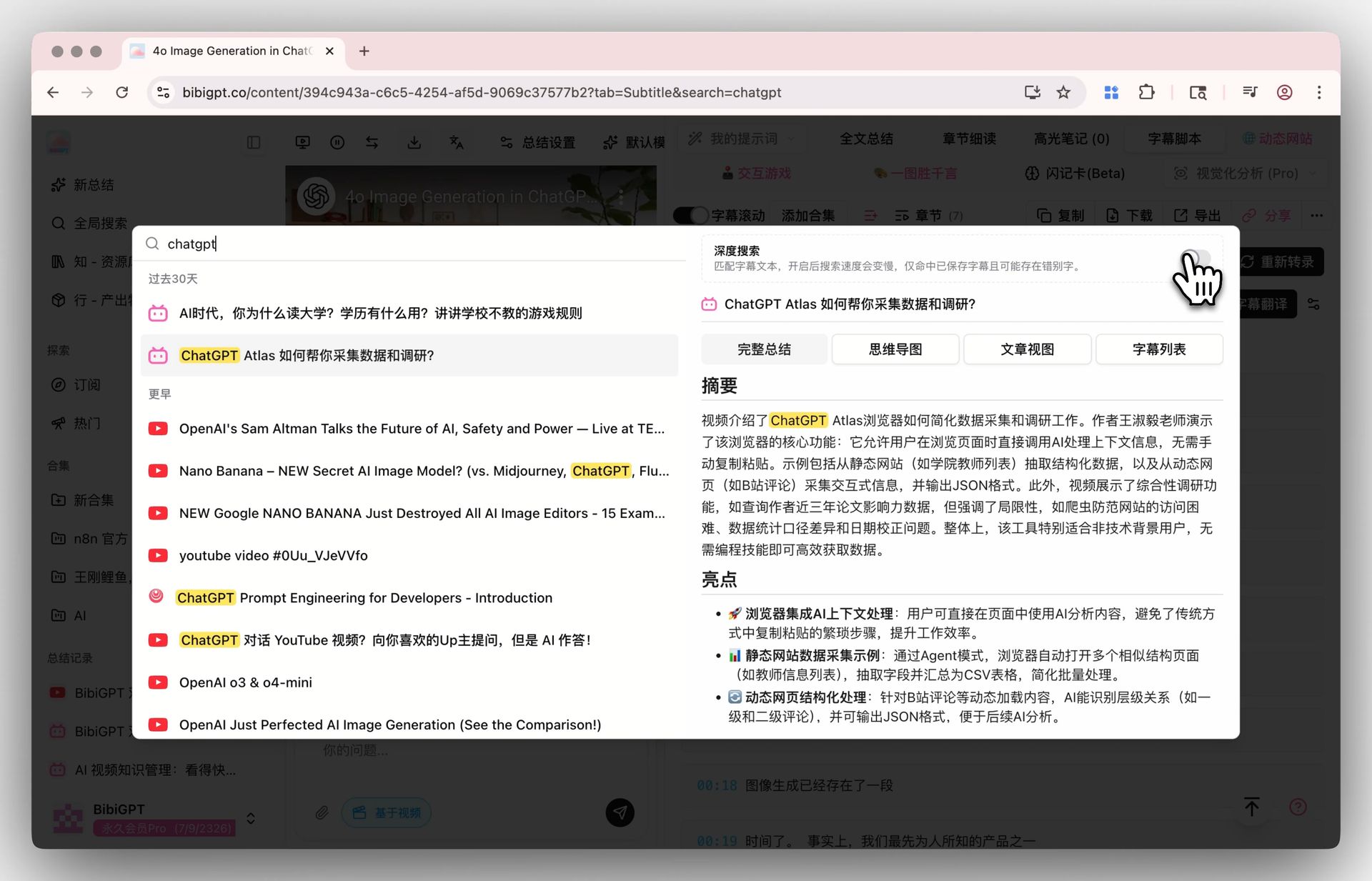
Search the transcript, then jump to the clip. Source: BibiGPT search.
How do other video summarizers compare?
Many summarizers stop at a block of text, or at chapter markers. Those are fine for deciding whether to watch a video, but not for checking a specific claim. Tools such as Summarize.tech offer timestamped chapters for YouTube. What to compare, whichever tool you try:
| What to check | Why it matters |
|---|---|
| Timestamp per key point (not only per chapter) | Lets you check a single sentence |
| Click plays the original at that second | Checking takes seconds, not minutes |
| Full transcript available | Context around the claim |
| AI chat answers cite moments | Follow-up questions stay checkable |
| Works beyond YouTube (Bilibili, podcasts, files) | One habit for all your sources |
If a tool cannot show you where a point came from, treat the point as a draft.
FAQ
Which video summarizer lets me check the original moment behind each key point?
BibiGPT does: every key point in its summary, every mind map node and every AI chat answer carries a clickable timestamp that plays the original video or podcast at that second. It works on YouTube, Bilibili, podcasts and local files.
Do chapter timestamps count?
They help you navigate, but a chapter can run for ten minutes. To check one claim you need a timestamp on that claim.
Does this work for podcasts without video?
Yes. BibiGPT transcribes the audio and keeps timestamps on the summary and transcript, so clicking a point plays the episode from that moment.
Try it on the next video you were going to “watch later”: summarize it with BibiGPT and click the first three timestamps.
Popular tools
More in this series
- AI Competitive Intelligence Workflow: Build Industry Monitoring with BibiGPT Video Summaries
- Lessons From Shipping BiliGPT: Two Cold-Start Growth Tactics Behind a GPT-3 Side Project
- [BibiGPT Growth Series] Episode 1 | How AI Summaries for Bilibili Were Born
- BibiGPT Advanced Guide 2026: Download + AI-Summarize Videos from WeChat Channels, RedNote, TikTok, and Enterprise Intranet Sites
- Chat with Any Video: How to Ask AI Questions About Videos Instead of Watching the Whole Thing (2026)