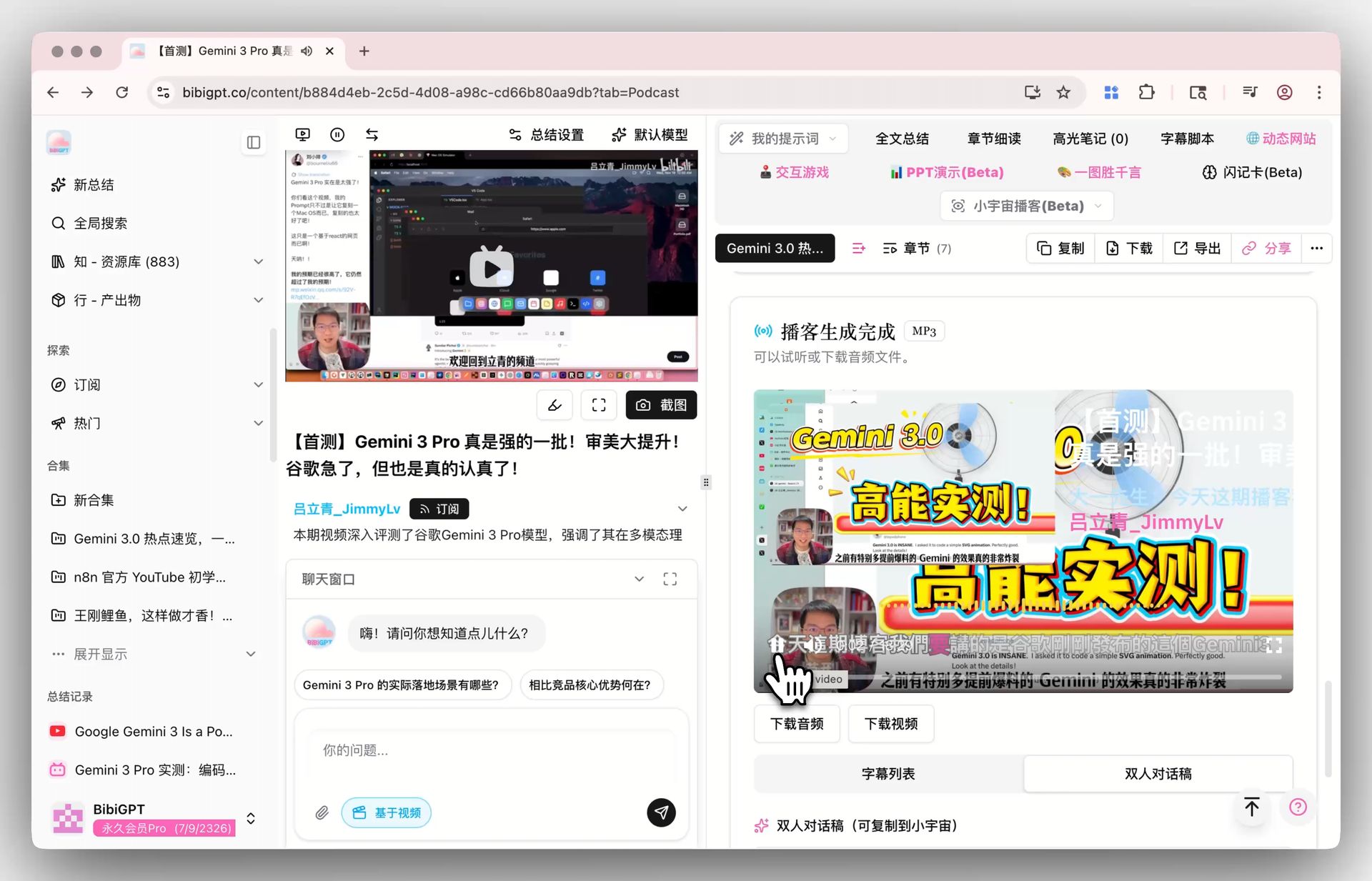
Top 10 AI Podcast Summarizer Tools in 2026: Which One Actually Listens for You

An AI podcast summarizer is software that turns podcast audio into a transcript and distills it into structured notes — built for commuters, researchers, and creators who listen daily but can’t retain or reuse what they hear.
Updated April 2026. Filtered to tools that actually ship and integrate with notes — early-stage demos excluded.
The Comparison Table at a Glance
| Tool | Best for | Price | Free trial |
|---|---|---|---|
| BibiGPT | All-platform audio/video integration (Xiaoyuzhou/Apple/Spotify/Ximalaya/YouTube — 30+ platforms, one workflow) | Free tier with daily allowance; Plus / Pro plans | ✅ Free tier, no expiry |
| Otter.ai | English meeting transcription | From $16.99/mo | ✅ Free 300 min/mo |
| Snipd | Highlight-collecting on Apple/Spotify | $5/mo (annual, ~$60/yr) | ✅ Limited free tier |
| Podsqueeze | Podcasters generating show notes | From $9/mo | ✅ Trial available |
| NoteGPT | YouTube chapter summaries | From $9.99/mo | ✅ Free tier |
| Glasp YouTube Summary | Quick single-video summaries | See official site | See official site |
| AssemblyAI Playground | Developers testing transcription | See official site | See official site |
| Spotify AI Summary | Native in-app episode blurbs | Bundled with Spotify | Bundled |
| Mindgrasp | Student course notes | From $19/mo | ✅ Free tier |
| Riverside Magic Clips | Clipping your own podcast | See official site | See official site |
We tested every tool on this list ourselves — feeding the same batch of English and Chinese podcasts through each one and comparing transcription quality, summary structure, and export experience firsthand, not from marketing pages.
What Actually Matters When Choosing a Podcast Summarizer?
Five dimensions decide the real experience: platform coverage, summary depth, follow-up Q&A, export options, and language support. Most roundups stop at “transcription accuracy” and “price,” and that’s not enough. Podcasts differ from meeting recordings in one big way: you listen to understand a topic, not to find “who said what at 12:34.” The five dimensions that actually decide the experience:
- Platform coverage — Apple Podcasts, Spotify, Xiaoyuzhou, Ximalaya, YouTube — multi-source matters
- Summary depth — timestamped paragraphs or structured highlights + key terms + thinking prompts?
- Follow-up Q&A — can you have a back-and-forth on the content?
- Multi-episode handling — can it handle 10 episodes of one show in a single sweep?
- Notes integration — Notion / Obsidian / Cubox / Readwise direct send?
Which AI Podcast Summarizer Is Best? Every Tool Reviewed
BibiGPT is the strongest overall pick because it pulls podcasts from 30+ platforms into one workflow, while Otter.ai and the other specialists each win a single narrower scenario like English meeting transcription. The reviews below show exactly where each tool stands and who should choose it.
1. BibiGPT: Best for All-Platform Audio/Video Integration
BibiGPT’s edge isn’t “strongest at one thing” — it’s pulling podcasts and audio/video scattered across 30+ platforms into a single workflow. Xiaoyuzhou, Apple Podcasts, Spotify, Ximalaya, YouTube, Bilibili links and local audio files all go through one entry point and come out as the same structured notes. For anyone listening across English and Chinese platforms, none of the other nine can match this.
Key features:
- Smart Deep Summary: key takeaways, thinking prompts, and term explanations — not just paragraph digests
- Collection-level workflow: Collection Summary generates a cross-episode synthesis + mind map; Collection AI Chat answers questions like “where do guests in these 10 episodes diverge on X?”
- Creator chain: AI Video to Article, Xiaohongshu Image Generator
- Notes integration: Notion / Obsidian / Cubox / Siyuan / Readwise one-click send
Here’s what Smart Deep Summary produced in our testing — output that reads like reviewable notes, not a transcript:
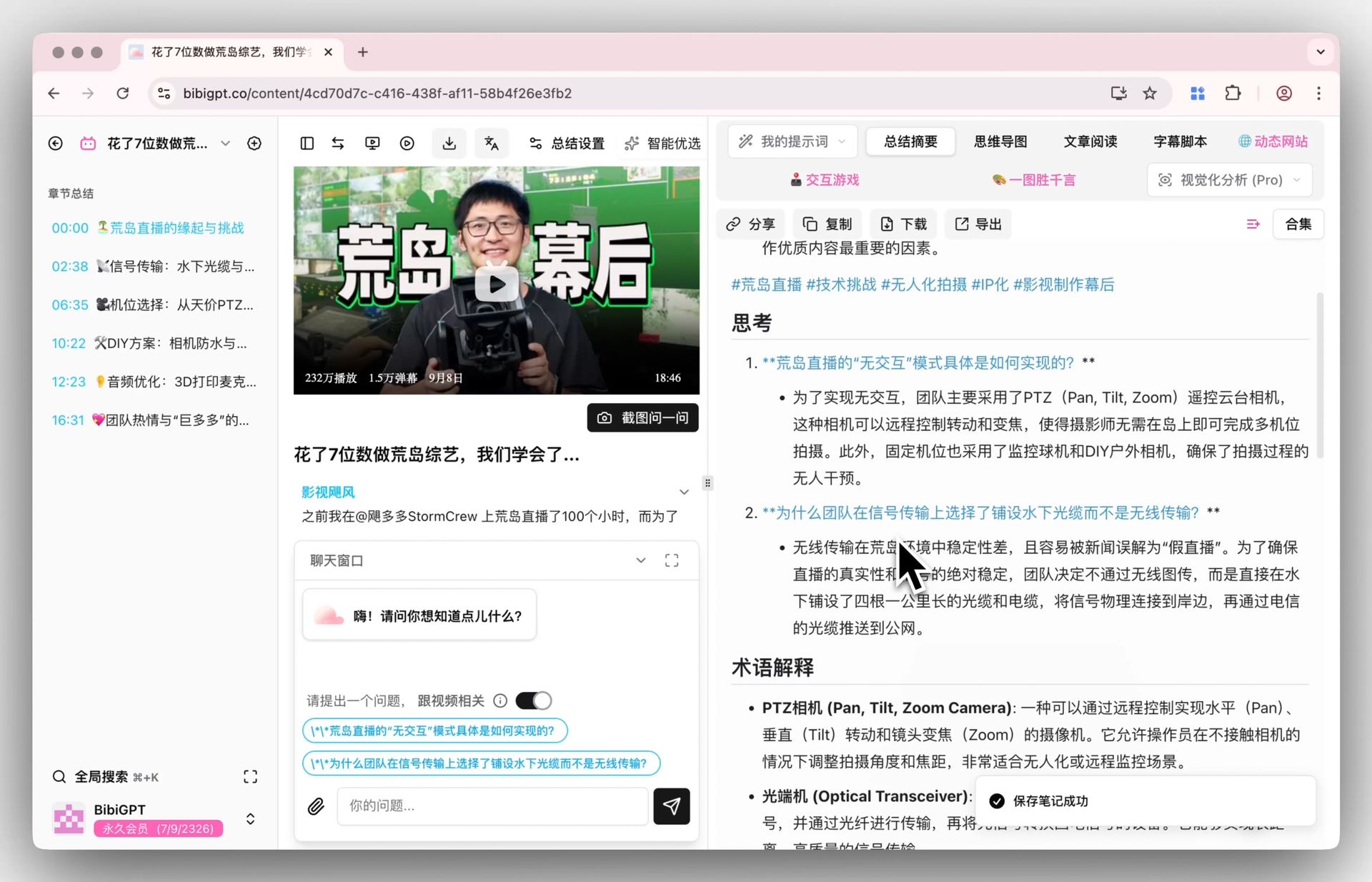
Smart Deep Summary auto-generates thinking prompts and term explanations alongside key takeaways.
Collection-level capability is the dividing line among all 10 tools; a cross-episode synthesis expands straight into a mind map:
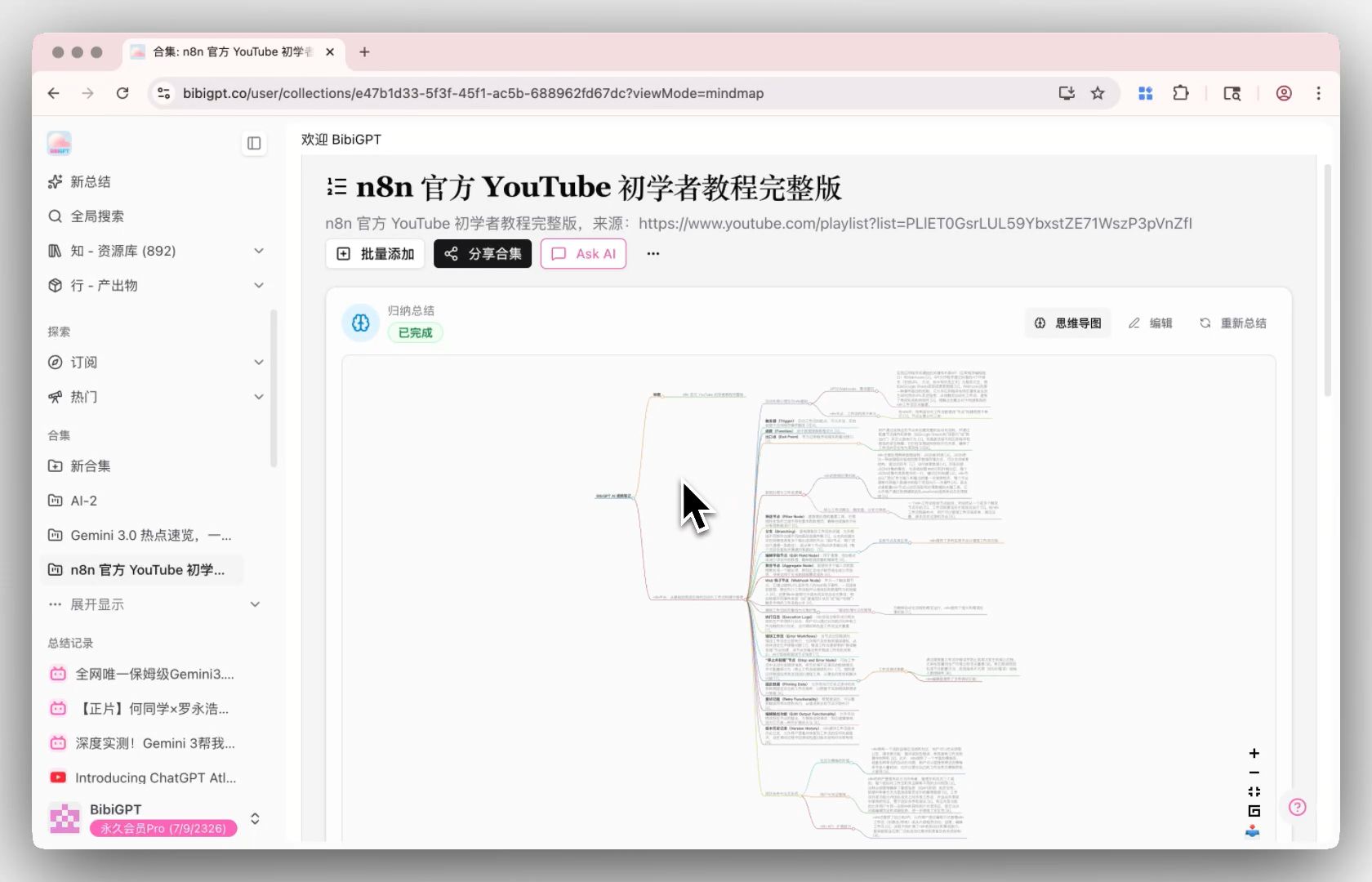
The cross-episode mind map generated by Collection Summary in one click.
Practical rule: if your podcasts live on more than two platforms (say Xiaoyuzhou + YouTube), the switching cost saved by one-stop processing outweighs any single feature comparison.
Price: Free tier with a daily allowance; Plus / Pro plans for heavy use.
Honest limitation: Best for heavy learners and creators who work across platforms, batch multiple episodes, and export to notes. If you only occasionally summarize a single YouTube video and never touch collections or exports, the feature surface will feel like more than you need — a lightweight single-page tool is simpler.
2. Otter.ai: Best for English Meeting Transcription
Otter’s home turf is meetings, not podcasts: real-time English transcription with paragraph summaries is its most polished capability.
Key features: real-time English transcription, paragraph-style meeting summaries, basic export.
Price: Free tier of 300 minutes per month; paid from $16.99/mo.
Honest limitation: Great for professionals processing English meeting recordings; not for podcast listeners — no podcast platform ingestion, no multi-episode handling, and weak Chinese-language support.
3. Snipd: Best for Highlight-Collecting on Apple/Spotify
Snipd nails “save the quote the moment you hear it”: highlights are captured with the audio snippet, synced straight to Readwise, with AI summaries on top.
Key features: audio highlight clips, AI summaries, Notion/Readwise sync, follow-up Q&A.
Price: $5/mo billed annually (~$60/yr), with a limited free tier.
Honest limitation: Best for heavy English-podcast listeners living in Apple/Spotify; not for Chinese listeners — Xiaoyuzhou and Ximalaya coverage is essentially zero, multi-episode handling is weak, and the annual fee runs higher than BibiGPT Plus.
4. Podsqueeze: Best for Podcasters Generating Show Notes
Podsqueeze serves the production side: feed it your show’s RSS and it batches out episode summaries and show notes.
Key features: RSS ingestion, episode summaries, show notes generation.
Price: From $9/mo, trial available.
Honest limitation: Best for podcasters running their own show; not for listeners — no follow-up Q&A, and notes integration stops at basic export.
5. NoteGPT: Best for YouTube Chapter Summaries
NoteGPT leans on YouTube, producing chapter-style summaries with follow-up Q&A.
Key features: chapter summaries, AI Q&A, limited multi-video processing.
Price: From $9.99/mo, free tier available.
Honest limitation: Best for people whose main source is YouTube; not for podcast listeners — podcast platform coverage is limited and multi-video processing only stitches summaries together, with no cross-episode comparison.
6. Glasp YouTube Summary: Best for Quick Single-Video Summaries
Glasp is the fastest path to a paragraph summary of one video — lightweight, zero learning curve.
Key features: single-video paragraph summaries on YouTube.
Price: See the official site.
Honest limitation: Best for light users who occasionally want a quick scan; not for systematic learning — YouTube only, no Q&A, no multi-episode capability, and basic notes support.
7. AssemblyAI Playground: Best for Developers Testing Transcription
An online testbed for a transcription API — transcript quality is the point; summaries are an afterthought.
Key features: custom audio upload, high-quality transcription.
Price: See the official site.
Honest limitation: Best for developers evaluating transcription quality; not for everyday listeners — no podcast ingestion, shallow summaries, and zero notes integration.
8. Spotify AI Summary: Best for Native In-App Episode Blurbs
Spotify’s built-in AI blurbs — nothing to install.
Key features: short episode descriptions, rendered natively in-app.
Price: Bundled with Spotify.
Honest limitation: Best for deciding “is this episode worth my time” inside Spotify; not for note-takers — brief descriptions only, no transcript, no Q&A, no export.
9. Mindgrasp: Best for Student Course Notes
Mindgrasp targets students, with multi-mode summaries across YouTube and local files.
Key features: multi-mode summaries, AI Q&A, local file support.
Price: From $19/mo, free tier available.
Honest limitation: Best for students processing lecture recordings; not for podcast listeners — weak podcast platform coverage, stitched-together multi-episode output, and pricing on the high side for the category.
10. Riverside Magic Clips: Best for Clipping Your Own Podcast
Riverside’s Magic Clips auto-cuts your self-recorded podcast into short video clips with transcripts.
Key features: short-form clip generation, transcripts.
Price: See the official site.
Honest limitation: Best for creators repurposing their own show; not for listeners consuming other people’s podcasts — it doesn’t process external podcast links at all.
How to Choose: Three Quick Matches
- Commuters (30-60 min/day, pain point: forgetting what you heard): BibiGPT for Chinese or mixed-language listening (Xiaoyuzhou/Ximalaya coverage + structured notes); Snipd if you live entirely in Apple/Spotify.
- Researchers (digesting 10 episodes on one topic): only BibiGPT offers full collection synthesis + cross-episode Q&A; NoteGPT and Mindgrasp only stitch summaries.
- Creators (turning other people’s podcasts into your content): BibiGPT’s article + social image + notes-export chain is the most complete; Riverside only fits self-recorded shows.
Practical rule: lock in platform first, then summary depth, then where your notes land — three steps usually leave only one or two tools that genuinely fit you.
FAQ
Q1: How do I pick my first tool?
A: Answer three questions: (1) which platforms do you actually listen on — Chinese platforms are covered comprehensively almost only by BibiGPT; (2) do you want a quick digest or structured notes with follow-up Q&A; (3) where do your notes live — Notion/Obsidian users should prioritize tools with direct integrations. Those three answers narrow the field to one or two picks.
Q2: Are there free options?
A: Yes. BibiGPT’s free tier with a daily allowance works indefinitely; Otter’s free tier gives 300 minutes a month; Snipd, NoteGPT and Mindgrasp all offer limited free tiers; Spotify AI Summary comes bundled with the platform. Run your workflow on a free tier first, then decide whether to subscribe.
Q3: How accurate is Chinese podcast transcription (Xiaoyuzhou/Ximalaya)?
A: BibiGPT internal benchmarks on common Chinese podcasts (talk shows, conversation formats) reach 95%+ accuracy. Tech and medical content with dense terminology runs slightly lower; smart subtitle segmentation plus a custom term dictionary closes the gap, and the custom transcription engine setting lets professional users switch engines as needed.
Q4: Why aren’t ChatGPT or Claude on the list?
A: ChatGPT and Claude don’t ingest podcasts — you’d have to paste transcripts manually. They’re general-purpose AI assistants, not vertical podcast tools, so the comparison isn’t apples-to-apples.
Q5: Why does the advanced multi-episode scenario matter so much?
A: Most learning isn’t “listen to one episode” — it’s “digest a topic.” Researchers consume 10 guest interviews; students consume an entire course; creators track a podcast series across releases. Single-episode tools handle the basics; collection-level capability is where real time savings live — most visible in Collection Summary + Collection AI Chat.
Try BibiGPT
Across “all-platform integration + summary depth + collection workflow + notes integration,” BibiGPT is the strongest 2026 pick — especially if your listening spans English and Chinese platforms.
BibiGPT Team
Popular tools
More in this series
- The AI Audio Briefing Wave: From Forbes Daily Top 3 to Turning Any Long Content Into a Listenable Podcast (2026)
- AI Podcast Summarizer Complete Guide 2026: From Transcript to Quote Cards
- AI Podcast Summarizer: 6 Tools Compared + BibiGPT Workflow (2026 Comprehensive Guide)
- AI Podcast Summary Workflow Guide 2026: From Transcription to Knowledge Management with BibiGPT
- AI Podcast Transcription Guide (2026): Turn Any Podcast Into Searchable Text With BibiGPT