BibiGPT v4.710.0: collection citations and bilingual sizes

Hey there, BibiGPT friends 👋
Over the past few days, BibiGPT shipped another round of updates. The one to open first this issue is citation jumping in collections: ask a question across a collection, tap a timestamp in a citation, and the mini player starts that episode at that exact second. If you make bilingual subtitle videos, you can finally size the original and the translation separately. Read faster, find it, put it to work — you can use all of that this issue.
⚡ Read faster
Qwen3.8 27B (fast) for audio/video summaries
When you want a quick pass over a long video, the tens of seconds you wait for the summary are the most tedious part.
Where: open bibigpt.co → Preferences → Summary settings → Default model → search “Qwen3.8” in “Choose a model”. Opening any summary or AI chat and tapping the model name at the top brings up the same list.
In the audio/video summary and chat model picker, the Alibaba group adds Qwen3.8 27B (fast), marked New, in the same price tier as Qwen3.8 27B. Its strength is getting the summary out faster, which suits a first pass over a long video; when you want more depth, Qwen3.8 Max in the same group is one tap away. See the Qwen3.8-27B model page on ModelScope.
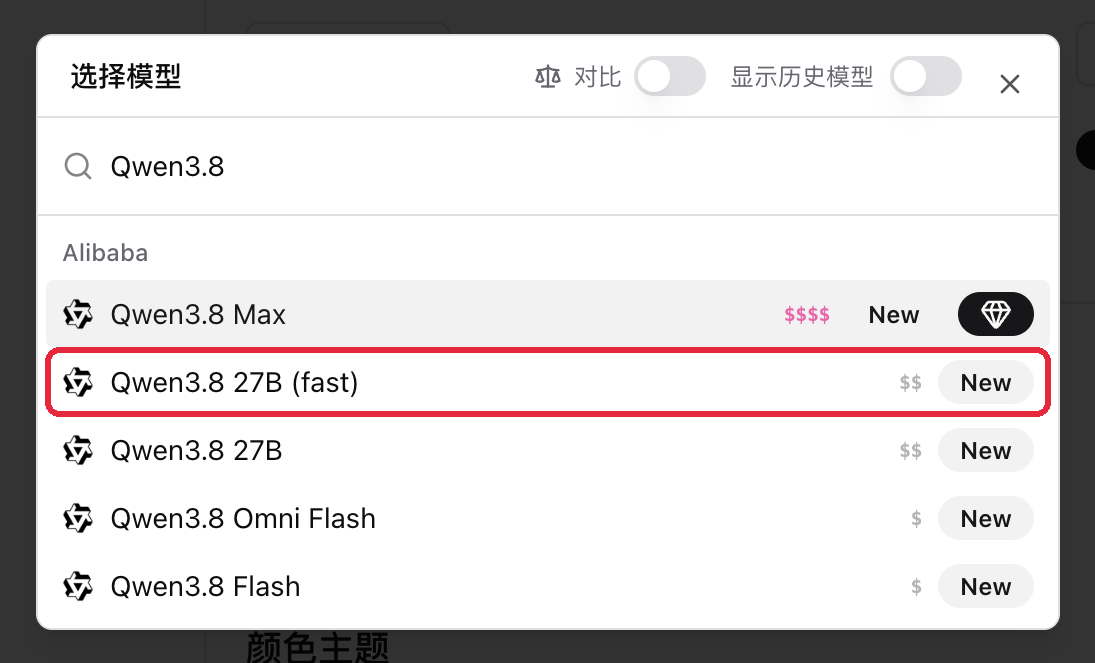
Screenshot: BibiGPT · search Qwen3.8 in “Choose a model”; the new 27B (fast) is marked New
🔎 Find it
Collection citations jump to the clip
Putting several episodes from the same creator or podcast into a collection and asking across them gives great answers — but when you wanted to go back to that part of the original, you still had to work out which episode and which minute.
Where: open bibigpt.co → Collections in the sidebar → open a collection with at least 2 episodes → ask in “AI Chat” → tap a timestamp under “Sources” below the answer.
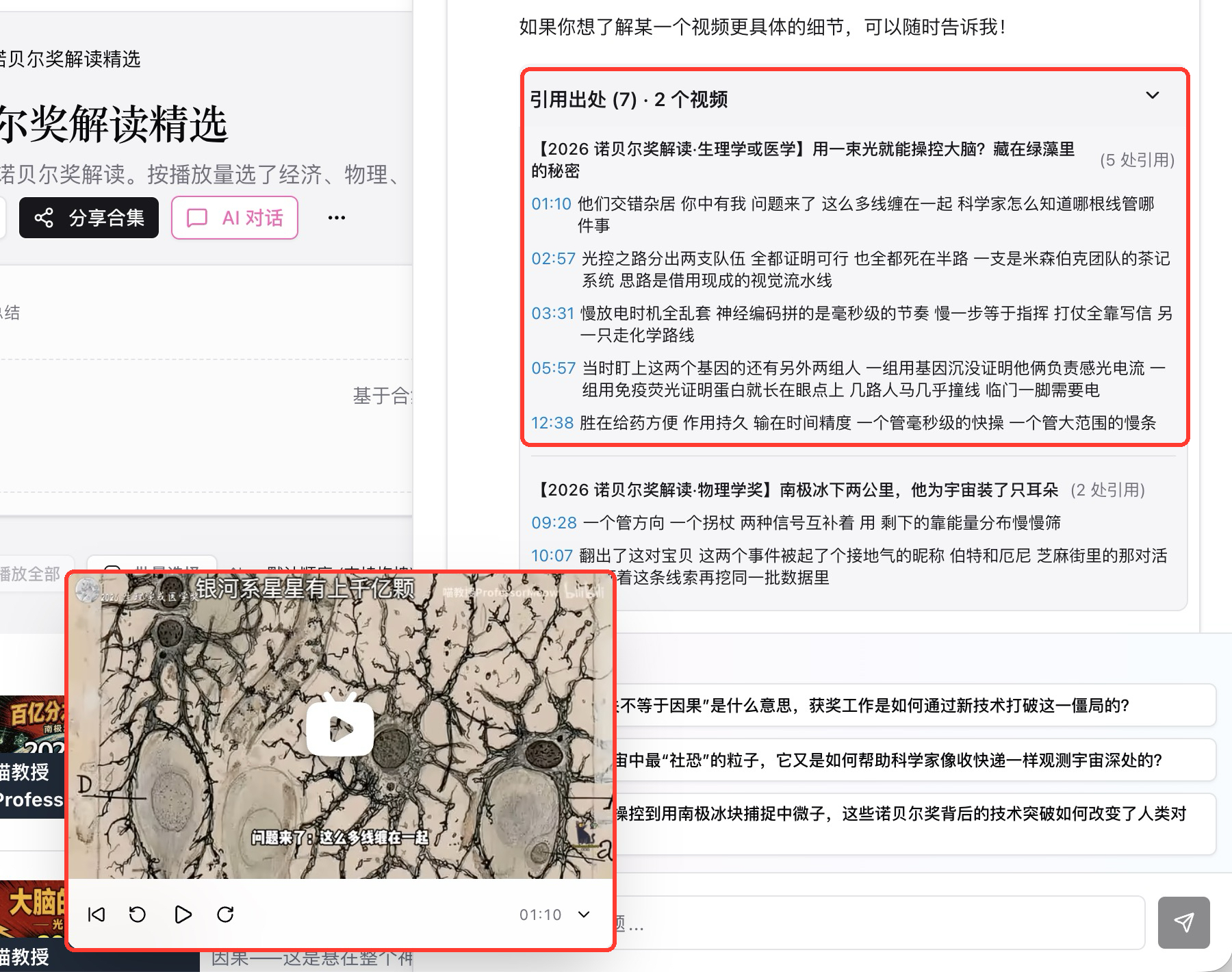
“Sources” are grouped by video, so you can see at a glance how many places each episode was cited. Tap any timestamp and a mini player pops up in the bottom-left, opens the cited episode, and plays from that moment, while the chat stays where it is so you can keep asking. Timestamps in the collection’s “Summary” and the times and numbers on its “Mind map” jump the same way.
Every line you get from a collection can take you back to that second of the original in one tap.
Screenshot: BibiGPT · “Sources” grouped by video; tap 01:10 and the mini player starts that episode at 01:10
🛠️ Put it to work
Bilingual burn-in font sizes
When making bilingual subtitle videos, the translation was always a size smaller than the original. Change the font or the aspect ratio and the two lines no longer looked balanced.
Where: open an item whose subtitles are already translated → “Subtitle script” → “Burn video” on the toolbar → the “Subtitle video export settings” dialog → switch to “Subtitle style”.
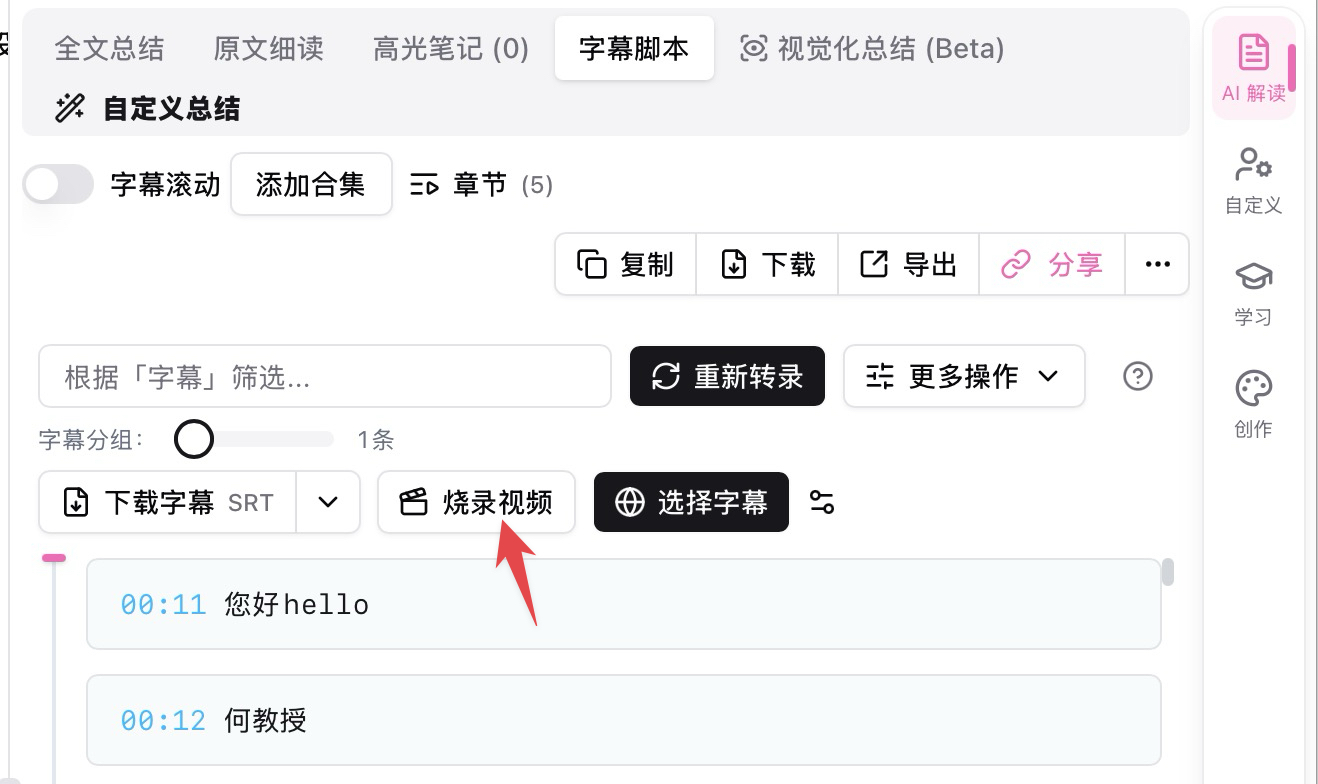
Screenshot: BibiGPT · “Burn video” on the “Subtitle script” toolbar
In “Subtitle style”, the original and the translation each get their own settings: font (the translation can “Follow original”), font color, and font size. The “Original font size” and “Translation font size” sliders are adjusted separately, the “Subtitle preview” above shows both lines’ sizes live, and the burned-in video matches the preview. Make the translation as large as the original, or make it stand out more — it’s your call.
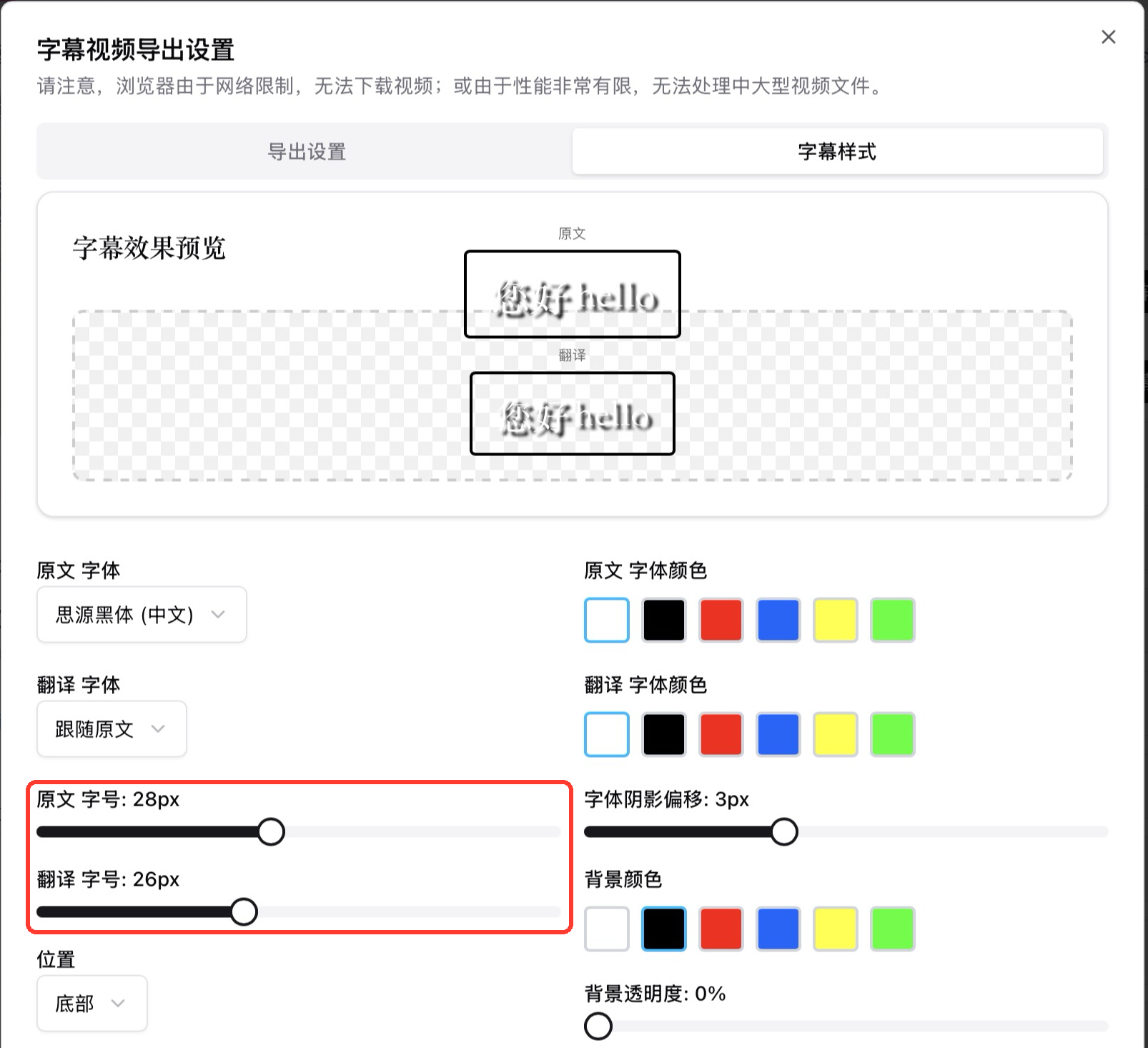
Screenshot: BibiGPT · in “Subtitle style”, the original and translation font-size sliders adjust separately
China site: phone and WeChat login
Signing in on the China site used to mean finding your email and remembering a password; authorizing inside mobile WeChat took an extra detour.
Where: open bibigpt.cn → “Sign up / Log in” in the top right.
The top of the sign-in page is “Scan with the Official Account to log in” — if desktop WeChat is already signed in, just confirm, no phone needed. Below are two tabs, “Phone / Email”, with phone as the default: enter your phone number, get a 6-digit code, and a new account is created if you don’t have one. The same phone number or WeChat always lands in the same account; if you signed in with WeChat and later add a phone number, it is written back to the current account rather than creating a second membership. Open bibigpt.cn inside mobile WeChat and the sign-in dialog shows “One-tap WeChat login” right away; after authorizing you stay on bibigpt.cn. The email tab keeps email-and-password sign-in, sign-up, and password recovery.
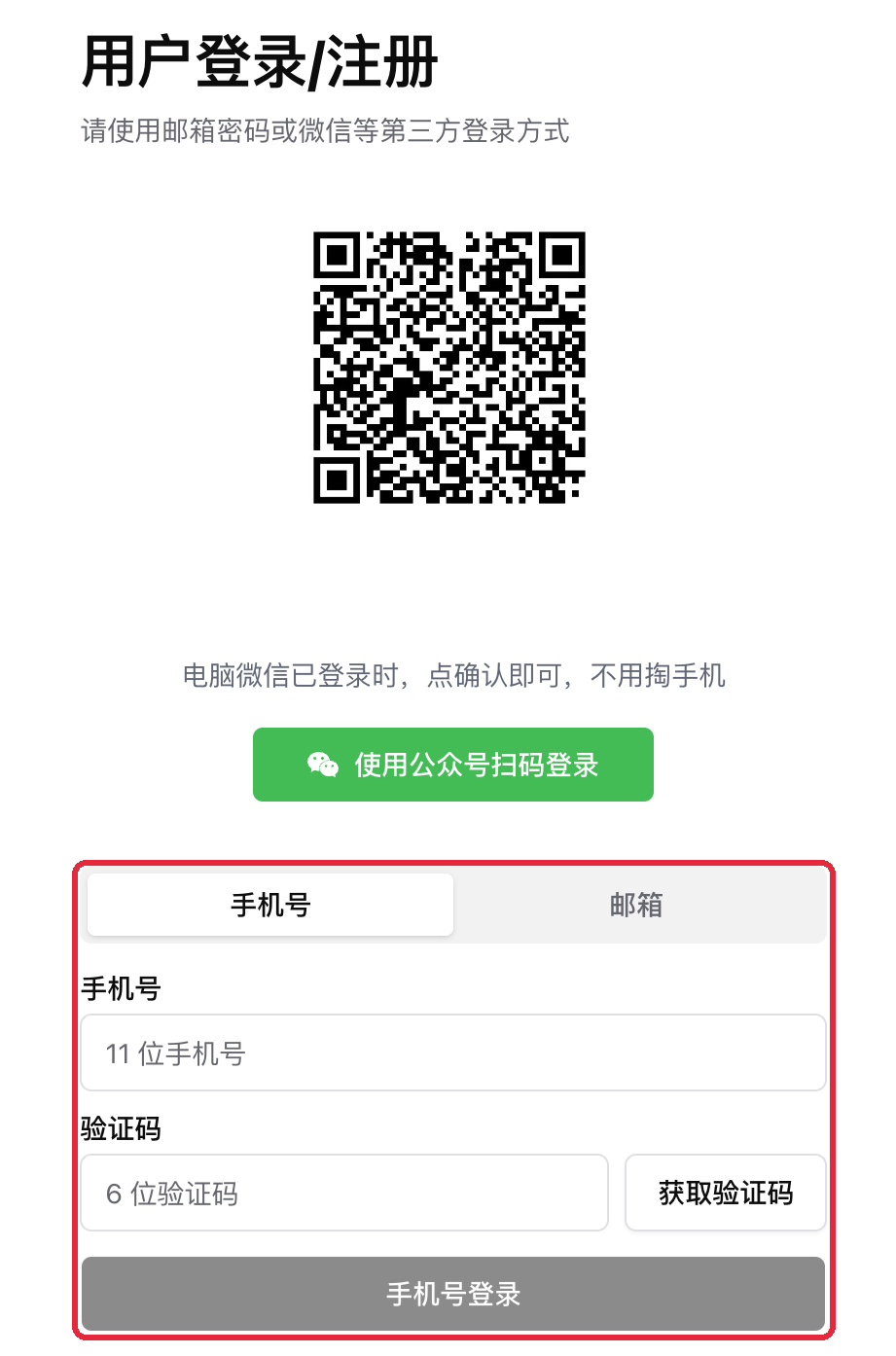
Screenshot: BibiGPT · bibigpt.cn sign-in page, Official Account scan and phone code on the same screen
Other recent improvements
- The editor’s “AI Highlights” can cut a condensed version of a whole video: pick a length (about 30 seconds to 3 minutes), a style (Key takeaways / Story & emotion / Fast hooks) and a target platform (Douyin / WeChat Channels, Xiaohongshu, Bilibili), then go straight to export; multiple highlights on the same topic can also be merged into one short video
- AI chat on a single video answers from the full subtitles, and tapping a number in the answer jumps to that timestamp
- When exporting notes, you can leave out bracketed timestamps like
[01:23]; jumping on the page still works - Note tags can be nested as “#parent/child”, and tapping the parent includes its children; collections can have an emoji
- Image generation for Xiaohongshu and Official Account posts, and for summary illustrations, adds several new Chinese image models — faster, and able to edit from a reference image
- Polishing a multi-speaker transcript keeps the speakers, and sentences you edited by hand stay exactly as they are
- In Subtitle Studio, turning off word-by-word highlighting before burning keeps the subtitles one color; if a rendered video already exists, you’re asked before it is overwritten
- After you change your password, other devices are signed out automatically while the one you’re using stays signed in
- The Windows desktop installer is now a zip download — unzip and install; installed clients keep updating automatically
Wrap-up
This issue, start by asking a cross-episode question in a collection and tapping a timestamp in the answer to see the mini player take you straight back to the original. If you make bilingual subtitle videos, set the two lines’ font sizes in “Subtitle style” before you burn. On the China site, just use your phone number or WeChat next time you sign in.
Ideas or issues? Leave us a note on the WeChat Official Account “魔法司”.
- 🌐 Website: bibigpt.co
- ✨ Explore features: bibigpt.co/features
- 🔌 Browser extension: bibigpt.co/apps/browser
- 💻 Desktop app: bibigpt.co/download/desktop
- 📱 Mobile app: bibigpt.co/app
—— BibiGPT Team
Popular tools
More in this series
- AI Competitive Intelligence Workflow: Build Industry Monitoring with BibiGPT Video Summaries
- Lessons From Shipping BiliGPT: Two Cold-Start Growth Tactics Behind a GPT-3 Side Project
- [BibiGPT Growth Series] Episode 1 | How AI Summaries for Bilibili Were Born
- BibiGPT Advanced Guide 2026: Download + AI-Summarize Videos from WeChat Channels, RedNote, TikTok, and Enterprise Intranet Sites
- Chat with Any Video: How to Ask AI Questions About Videos Instead of Watching the Whole Thing (2026)